

All fields are required on the Rental Assumptions Input page, except for the Load Factor variable. If there is no load factor, simply leave blank or input "0".
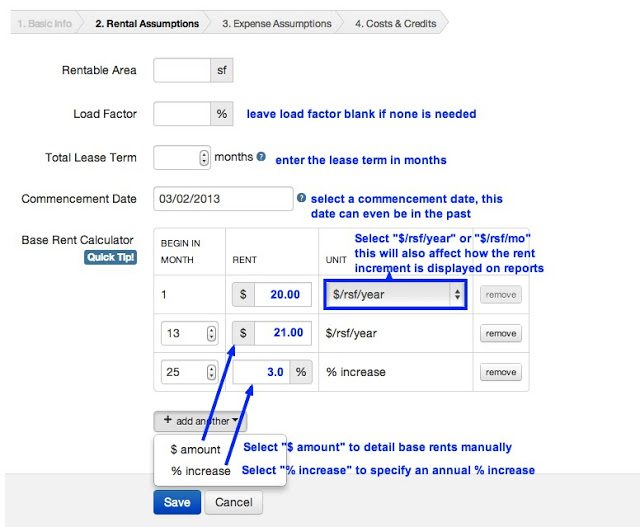
Please specify the Total Lease Term in Months. For example, a 5 year lease would be 60 months; 10 years would be 120 months.
Using the Base Rent Calculator, you can enter base rent increases in one of two ways:
Select "$ amount" to manually detail any rental increases (i.e. $20.00; $21.00, and so on... as shown in months 1 and 13 above)
Select "% increase" to input an annual percentage escalation (i.e. 3.0% as above). Then, we will automatically increase the base rent by the percentage specified starting in the Beginning Month and upon every 12 months thereafter.
Also, you can specify whether the Base Rent is quoted in annual or monthly increments using the $/rsf/year dropdown box. The increment entered will also be the increment displayed on the analysis reports. Learn more about this feature
NOTE ON FREE RENT: You will be able to enter any free rent period(s) in Step 4: Costs & Credits. Please enter the Scheduled Base Rent into the calculator as if there is no free rent.
Once the all the Rental Assumptions are entered, click Save to proceed to the Expense Assumptions input page.