

Sometimes, it is necessary to delay the grow of an expense item. To help you do this, we've developed a simple calculator which you can access here.
As an example as a way you can use this calculator, let's say you want to delay the inflation of a $5,000 expense until year 3 (i.e. beginning in month 25). Using this result, input it as follows:
Using this calculator, the following would be input in the yellow cells:
access the live calculator here
This information would then be input as follows:

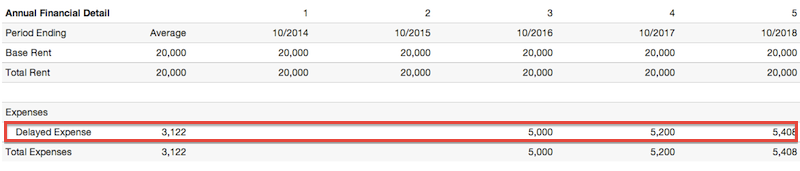
And the result in this instance is then a Delayed Expense of $5,000 beginning in Year 3, as show below:
This calculator also handles expenses on a RSF basis. For example, assuming a $5.00 RSF expense on a 1,000 RSF lease, the input would be:

Understanding that this technique is not ideal, it is a solution until we implement the ability to delay inflation factors by line item.